
16 Useful Websites Built Before AI Took Over


The web was full of clever human-made tools long before artificial intelligence became a dominant force in our daily browsing. Many of the most useful websites still solve a clear problem, teach something unexpected, or offer a welcome break from noisy feeds without relying on modern AI tools to function.
These 16 sites help you edit images, protect your accounts, trace global connections, and wander through history. This curated list features platforms that each do one job well, and none of them have become less interesting simply because new technology arrived.
Key Takeaways
Online applications can replace many one-off downloads and subscriptions.
Interactive maps reveal hidden systems behind weather, travel, and internet access.
Archives and public-domain libraries act like a specialized search engine for history, making old information easier to find and use.
Privacy tools help you review old accounts and respond to a known data breach.
The most memorable sites invite participation, not passive scrolling.
Useful Websites That Make Everyday Tasks Easier
These practical browser tools help you create, fix, compare, or clean up digital clutter without installing a large desktop program. These lightweight web utilities offer high functionality without the hardware requirements of professional video editing suites or massive software installations.
Photopea Brings Full Image Editing to Your Browser
Photopea is a browser-based image editor built for more than quick crops. You can adjust photos, perform complex graphic design tasks, work with layers, and even function as a capable PDF editor without installing Photoshop.

It is handy for small business owners, students, and creators who need capable editing on a shared or low-powered computer. Before uploading client work or personal images, review current file support and privacy practices.
Remove.bg Cleans Up Photo Backgrounds in Seconds
Remove.bg separates a person, product, or object from its background with minimal effort. That makes it useful for product listings, profile photos, presentation slides, and social media images. Using this tool to customize your own photography can often save you the expense of purchasing generic stock images.

The result can save time when the subject has a clean outline. However, inspect edges around hair, transparent materials, or detailed objects before using an image in a professional campaign. Automation is fast, but it can still miss fine details.
AlternativeTo Helps You Find Better Software Options
AlternativeTo is a discovery directory for people who are tired of accepting the first popular app they find. Search for a paid, discontinued, or unsuitable program, then browse competing services, open source software, or community suggestions. Whether you are looking for a specialized resume builder or searching for the best productivity apps for remote jobs, this site makes comparison easy.

The site can uncover a tool that better fits your budget or operating system. Still, check licensing terms, security information, and recent update activity before moving important files or team work to a new platform.
JustDelete.me Makes Account Removal Less Frustrating
Old accounts often linger because companies bury their deletion pages behind menus and help articles. JustDelete.me collects account-deletion links and guidance in one place, making digital housekeeping less tedious.
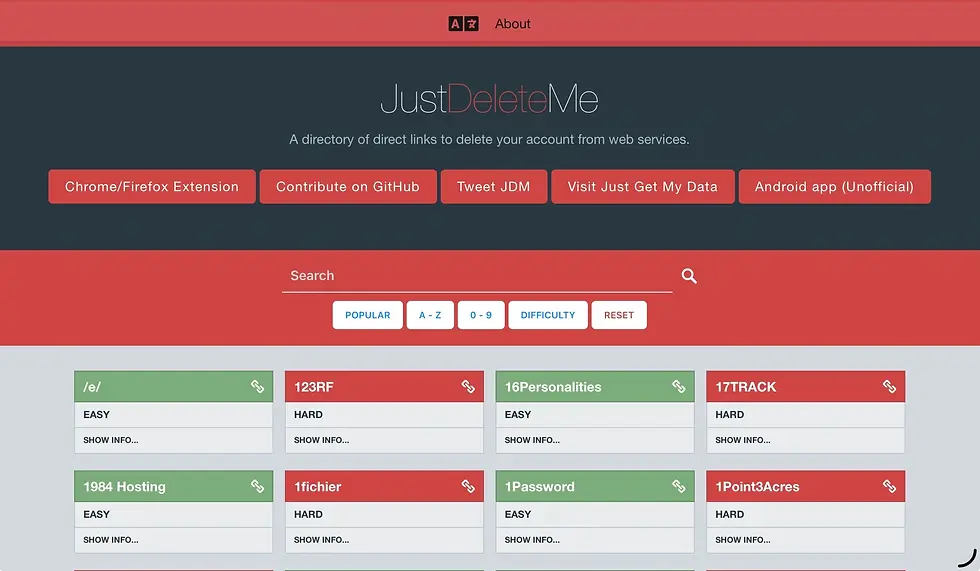
Removing unused accounts can reduce your exposure if an old service suffers a data breach. Policies change often, though, so confirm every step on the company's official site before submitting a request or entering account credentials.
Websites That Help You Explore a Connected World
These interactive experiences make invisible networks easier to see. They connect local sounds, global weather, air travel, maps, and the physical cables carrying online communication.
Radio Garden Lets You Tune In Around the Globe
Radio Garden turns the planet into a listening device. Spin its globe, choose a dot, and hear live radio stations from cities and towns around the world.

A few minutes can introduce you to local music, news, accents, and languages that never reach your usual playlists. It serves as an excellent resource for language learning, providing authentic audio exposure in a way few other sites can. Beyond media, a community discussion about useful productivity tools also shows how often people discover useful services through recommendations and community-driven platforms.
Earth Nullschool Turns Live Weather Data Into a Moving Map
Earth Nullschool displays animated wind patterns, ocean currents, temperatures, and atmospheric conditions across the globe. Its flowing lines make large weather systems easier to grasp than a static forecast graphic.

The site is a masterclass in data visualization, showcasing the kind of complex web development that turns raw scientific inputs into fluid, browser-based art. Use it to explore how air and water move around the planet. It is not a substitute for National Weather Service alerts, local emergency notices, or aviation forecasts when safety decisions depend on current conditions.
The Submarine Cable Map Reveals the Internet Beneath the Seas
Much of the internet's international traffic travels through fiber-optic cables on the ocean floor. The Submarine Cable Map charts those routes, landing points, cable owners, and connection paths between regions.

The map gives a physical shape to something most people treat as weightless. It also explains why cable damage, geopolitical disputes, and concentrated landing stations can disrupt communication far beyond one coastline.
The True Size Fixes Misleading World Map Comparisons
Most familiar world maps distort country size, especially near the poles. The True Size lets you drag one country across different latitudes and compare its scale with another place.

Move Greenland toward the equator, for example, and its apparent size changes dramatically. The experience makes map projection less abstract and gives travelers, students, and curious browsers a more accurate sense of geography.
Interactive Websites for Travel, History, and Discovery
Some sites turn browsing into a small expedition. They show movement across the sky, preserve vanished pages, connect historical events, or offer a view from a stranger's window. Many of these tools are also available as a browser extension, allowing you to access these unique digital experiences with a single click.
Flightradar24 Makes Global Air Traffic Visible
Flightradar24 acts as a live search engine for the skies, placing aircraft movement on an interactive map. Travelers can follow an incoming flight, aviation fans can inspect routes, and curious users can see how crowded major air corridors become in real time.

Flight information may be delayed, incomplete, or limited by coverage and privacy rules. Even with those limits, the map makes the scale of modern air travel visible in a way traditional departure boards never can.
The Wayback Machine Preserves the Web's Changing History
The Internet Archive includes the Wayback Machine, which stores snapshots of websites over time. It is an essential resource for web development research, as it allows developers to study the evolution of interface design and retrieve lost stock images or assets that are no longer available on live sites. It also hosts books, audio, video, software, and other digital materials.

Search an old company page, a defunct blog, or a disappeared resource to see what once existed online. Archived pages may have missing images, broken links, or incomplete features, but they remain useful evidence of the web's constant change. A roundup of online applications shows why enduring web tools still attract attention.
Histography Turns Human History Into an Interactive Timeline
Histography presents historical events on an interactive timeline that users can browse by period and topic. The visual layout helps you notice overlap between events that a textbook might place in separate chapters.

It is a good starting point for curiosity, especially when you want a broad sense of when things happened. Verify dates, interpretations, and important claims with academic sources or museum collections before citing them.
Window Swap Offers a Quiet View From Somewhere Else
Window Swap plays short window views submitted by people in different parts of the world. One click might show rain on a street in Europe, bright sun in a distant apartment, or trees moving outside a rural home.

There is little to do except watch and listen. That restraint is the point. The site offers a calm pause from comment sections, alerts, and endlessly refreshed content.
Old-School Web Projects That Still Teach and Inspire
The final group proves that a website does not need a complex feed or a chatbot to hold attention. These projects support reading, sketching, personal security, and playful learning.
Project Gutenberg Keeps Public-Domain Books Free to Read
Project Gutenberg offers a large collection of public-domain e-books in simple formats. Students, researchers, lifelong readers, and people using older devices can access classic literature without a proprietary reader. As a massive archive of digital text, it serves as a reliable form of file storage for the world's most important literature.

Public-domain rules vary by country, so check local law before republishing or distributing a text. For personal reading, the library is a remarkably direct path to books that remain widely taught and discussed.
Excalidraw Makes Diagrams Feel More Human
Excalidraw is a collaborative drawing tool with a hand-drawn visual style. It helps people sketch workflows, wireframes, lesson plans, meeting notes, and rough ideas without polished design skills. This makes it an excellent choice for informal note taking and visual brainstorming, while also providing enough utility to serve as a lightweight companion for project management tasks.

A rough diagram can make a conversation clearer than a perfect slide deck. Because the interface feels informal, teams often spend less time fussing over appearance and more time discussing the idea itself.
Have I Been Pwned? Checks Whether Your Data Appeared in a Breach
Have I Been Pwned lets you check whether an email address appears in known data breaches. It offers awareness, not a guarantee that an account is secure. If your information was exposed in a past data breach, knowing is the first step toward better digital hygiene.

If your email appears, change any reused passwords immediately, create unique credentials with a password manager, and enable multi-factor authentication. Avoid suspicious follow-up emails that claim to help with a breach.
Neal.fun Shows How the Web Can Still Surprise You
Neal.fun is a collection of playful interactive projects that explain ideas through participation. You might compare the size of enormous objects, explore history, or experiment with simple visual concepts. Unlike many modern automation tools that prioritize speed and efficiency, this site focuses on the joy of discovery.

The projects work because they make you click, scroll, and test instead of only reading. Adults and younger users can find different reasons to stay, so explore several experiences rather than judging the site by one page.
Frequently Asked Questions
Do these websites require a subscription or account to use?
Most of the tools listed here are free to use and do not require account creation to access their primary functions. While some services may offer optional accounts to save your work or preferences, you can generally utilize their core features as a guest.
Are these websites safe to use for sensitive work?
While these tools are highly functional, you should always exercise caution when uploading personal documents or sensitive photos. Review each site's privacy policy and terms of service to understand how they handle data before processing your important files.
How often are these tools updated?
These websites are maintained by their respective developers to ensure they remain compatible with modern browsers, though update frequencies vary by platform. It is always a good practice to check for recent changes and use standard digital security habits whenever interacting with external web tools.
The Web Still Rewards Curiosity
Great websites do not need complex AI tools to remain useful, memorable, or ahead of their time. These online applications offer practical help, privacy awareness, global exploration, education, and creative space without asking you to surrender your attention to another endless feed. While the current surge in artificial intelligence is undeniable, exploring these enduring platforms provides a necessary balance to modern digital trends.
Bookmark the useful websites that fit your needs, and always use care with personal files, live data, and copyrighted material. The best online resources often begin with a small question: what else has the web been hiding in plain sight?

Comments